Let's start with the configurations related to control plane components.
### Static Pod Manifests
All the control plane components are started by the kubelet from the static pod manifests present in the `/etc/kubernetes/manifests` directory.
The following components are deployed from the static pod manifests.
1. etcd
2. API server
3. Kube controller manager
4. Kube scheduler.
```
manifests
├── etcd.yaml
├── kube-apiserver.yaml
├── kube-controller-manager.yaml
└── kube-scheduler.yaml
```
You can get all the configuration locations of these components from these pod manifests.
### API Server Configurations
If you look at the **`kube-apiserver.yaml`**, under the [container](https://devopscube.com/what-is-a-container-and-how-does-it-work/) spec you can see all the parameters that point to TLS certs and other required parameters for the API server to work and communicate with other cluster components.
```
apiVersion: v1
kind: Pod
metadata:
annotations:
kubeadm.kubernetes.io/kube-apiserver.advertise-address.endpoint: 172.31.42.106:6443
creationTimestamp: null
labels:
component: kube-apiserver
tier: control-plane
name: kube-apiserver
namespace: kube-system
spec:
containers:
- command:
- kube-apiserver
- --advertise-address=172.31.42.106
- --allow-privileged=true
- --authorization-mode=Node,RBAC
- --client-ca-file=/etc/kubernetes/pki/ca.crt
- --enable-admission-plugins=NodeRestriction
- --enable-bootstrap-token-auth=true
- --etcd-cafile=/etc/kubernetes/pki/etcd/ca.crt
- --etcd-certfile=/etc/kubernetes/pki/apiserver-etcd-client.crt
- --etcd-keyfile=/etc/kubernetes/pki/apiserver-etcd-client.key
- --etcd-servers=https://127.0.0.1:2379
- --kubelet-client-certificate=/etc/kubernetes/pki/apiserver-kubelet-client.crt
- --kubelet-client-key=/etc/kubernetes/pki/apiserver-kubelet-client.key
- --kubelet-preferred-address-types=InternalIP,ExternalIP,Hostname
- --proxy-client-cert-file=/etc/kubernetes/pki/front-proxy-client.crt
- --proxy-client-key-file=/etc/kubernetes/pki/front-proxy-client.key
- --requestheader-allowed-names=front-proxy-client
- --requestheader-client-ca-file=/etc/kubernetes/pki/front-proxy-ca.crt
- --requestheader-extra-headers-prefix=X-Remote-Extra-
- --requestheader-group-headers=X-Remote-Group
- --requestheader-username-headers=X-Remote-User
- --secure-port=6443
- --service-account-issuer=https://kubernetes.default.svc.cluster.local
- --service-account-key-file=/etc/kubernetes/pki/sa.pub
- --service-account-signing-key-file=/etc/kubernetes/pki/sa.key
- --service-cluster-ip-range=10.96.0.0/12
- --tls-cert-file=/etc/kubernetes/pki/apiserver.crt
- --tls-private-key-file=/etc/kubernetes/pki/apiserver.key
image: registry.k8s.io/kube-apiserver:v1.26.3
```
So if you want to troubleshoot or verify the cluster components configurations, first you should look at the static pod manifest configurations.
### ETCD Configurations
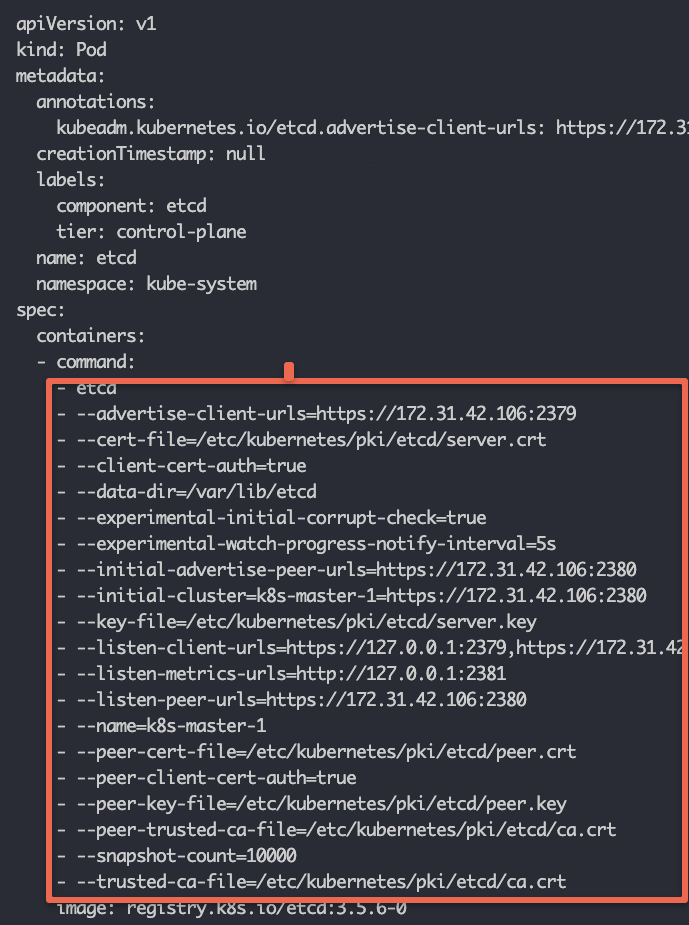
If you want to interact with the etcd component, you can use the details from the static pod YAML.
For example, if you want to [backup etcd](https://devopscube.com/backup-etcd-restore-kubernetes/) you need to know the etcd service endpoint and related certificates to authenticate against etcd and create a backup.
If you open the **`etcd.yaml`** manifest you can view all the etcd-related configurations as shown below.
[](https://devopscube.com/content/images/2025/03/image-11-26.png)
### TLS Certificates
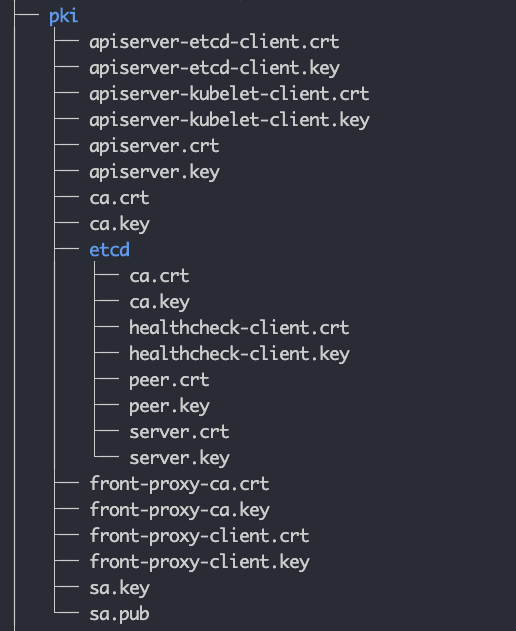
In Kubernetes, all the components talk to each other over mTLS. Under the PKI folder, you will find all the TLS certificates and keys. Kubernetes control plane components use these certificates to authenticate and communicate with each other.
Also, there is an etcd subdirectory that contains the etcd-specific certificates and private keys. These are used to secure communication between etcd nodes and between the API server and etcd nodes.
The following image shows the file structure of the PKI folder.
[](https://devopscube.com/content/images/2025/03/image-8-32.png)
The static pod manifests refer to the required TLS certificates and keys from this folder.
When you work on a self-hosted cluster using tools like kubeadm, these certificates are automatically generated by the tool. In managed kubernetes clusters, the cloud provider takes care of all the TLS requirements as it is their responsibility to manage control plane components.
However, if you are setting up a self-hosted cluster for production use, these certificates have to be requested from the organization's network or security team. They will generate these certificates signed by the organization's internal Certificate authority and provide them to you.
### Kubeconfig Files
Any components that need to authenticate to the API server need the [kubeconfig file](https://devopscube.com/kubernetes-kubeconfig-file/).
All the cluster Kubeconfig files are present in the `**/etc/kubernetes**` folder (.conf files). You will find the following files.
1. admin.conf
2. controller-manager.conf
3. kubelet.conf
4. scheduler.conf
It contains the API server endpoint, cluster CA certificate, cluster client certificate, and other information.
The **`admin.conf,`** file, which is the admin kubeconfig file used by end users to access the API server to manage the clusters. You can use this file to connect the cluster from a remote workstation.
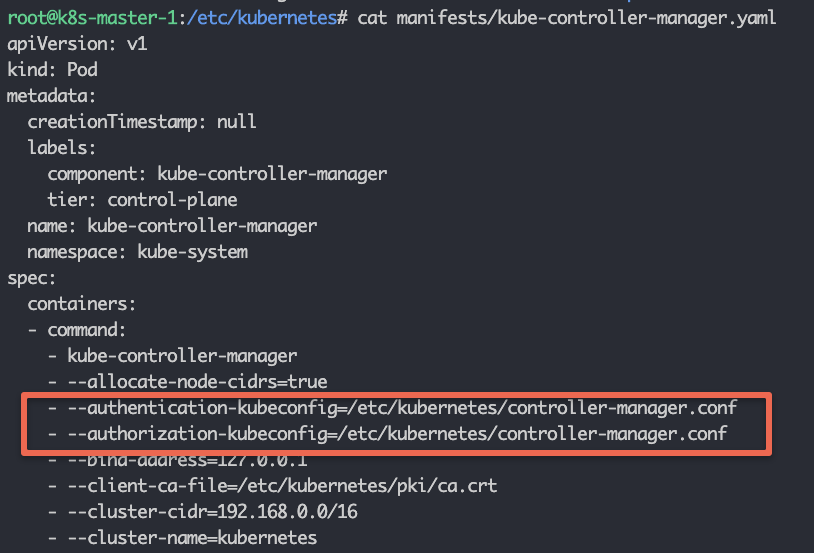
The Kubeconfig for the Controller manager, scheduler, and Kubelet is used for API server authentication and authorization.
For example, if you check the Controller Manager static pod manifest file, you can see the **`controller-manager.conf`** added as the authentication and authorization parameter.
[](https://devopscube.com/content/images/2025/03/image-10-33.png)
## Kubelet Configurations
Kubelet service runs as a systems service on all the cluster nodes.
You can view the kubelet systemd service under **`/etc/systemd/system/kubelet.service.d`**
Here are the system file contents.
```
[Service]
Environment="KUBELET_KUBECONFIG_ARGS=--bootstrap-kubeconfig=/etc/kubernetes/bootstrap-kubelet.conf --kubeconfig=/etc/kubernetes/kubelet.conf"
Environment="KUBELET_CONFIG_ARGS=--config=/var/lib/kubelet/config.yaml"
EnvironmentFile=-/var/lib/kubelet/kubeadm-flags.env
EnvironmentFile=-/etc/default/kubelet
ExecStart=
ExecStart=/usr/bin/kubelet $KUBELET_KUBECONFIG_ARGS $KUBELET_CONFIG_ARGS $KUBELET_KUBEADM_ARGS $KUBELET_EXTRA_ARGS
```
I have highlighted two important kubelet configurations in bold.
1. kubelet kubeconfig file: **/etc/kubernetes/kubelet.conf**
2. kubelet config file: **/var/lib/kubelet/config.yaml**
3. EnvironmentFile=-**/var/lib/kubelet/kubeadm-flags.env**
The kubeconfig file will be used for API server authentication and authorization.
The **/var/lib/kubelet/config.yaml** contains all the kubelet-related configurations. The static pod manifest location is added as part of the **staticPodPath** parameter.
```
staticPodPath: /etc/kubernetes/manifests
```
**/var/lib/kubelet/kubeadm-flags.env** file contains the container runtime environment Linux socket and the infra container (pause container) image.
For example, here is the kubelet config that is using the CRI-O container runtime, as indicated by the Unix socket and the pause container image.
```
KUBELET_KUBEADM_ARGS="--container-runtime-endpoint=unix:///var/run/crio/crio.sock --pod-infra-container-image=registry.k8s.io/pa
```
A pause container is a minimal container that is the first to be started within a Kubernetes Pod. Then the role of the pause container is to hold the networking namespace and other shared resources for all the other containers in the same Pod.
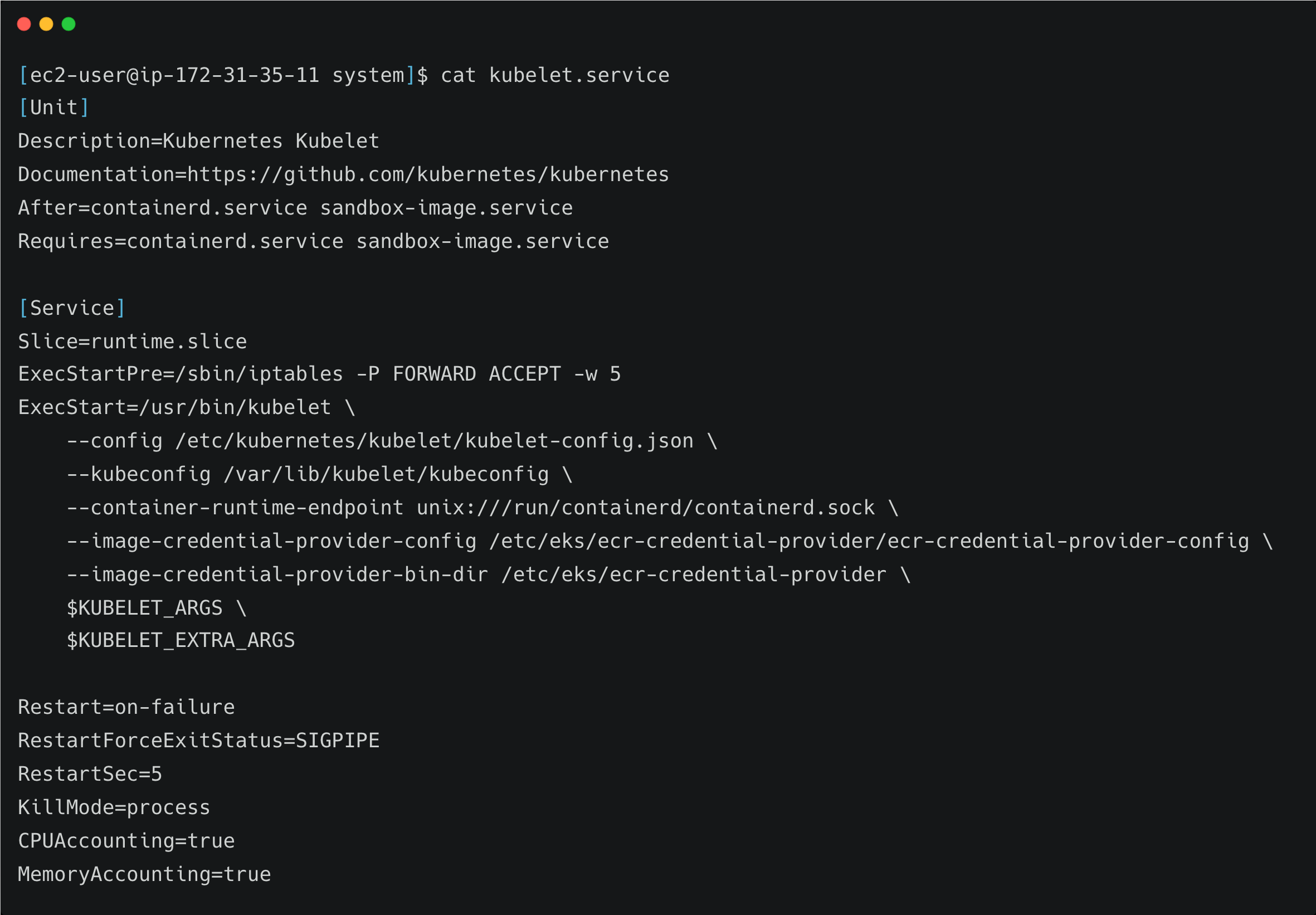
If you look at the kubelet configuration in the managed k8s cluster, it looks a little different than the kubeadm setup.
For example, here is a kubelet service file for an [AWS EKS cluster](https://devopscube.com/create-aws-eks-cluster-eksctl/).
[](https://devopscube.com/content/images/2025/03/carbon-9-1.png)
Here you can see the container runtime is containerd and its Unix socket flag is directly added to the service file
The kubelet kubeconfig file is in a different directory as compared to kubeadm configurations.
## CoreDNS Configurations
[CoreDNS](https://coredns.io/?ref=devopscube.com) addon components deal with the cluster DNS configurations.
All the CoreDNS configurations are part of a configmap named CoreDNS in the kubesystem namespace.
If you list the **`Configmaps`** in the kube-system namespace, you can see the CoreDNS configmap.
```
kubectl get configmap --namespace=kube-system
```
[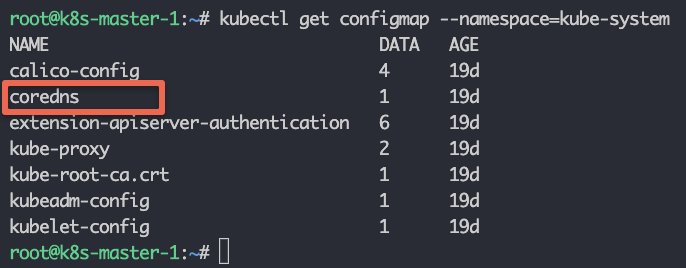](https://devopscube.com/content/images/2025/03/image-12-23.png)
use the following command to view the **CoreDNS** configmap contents.
```
kubectl edit configmap coredns --namespace=kube-system
```
You will see the following contents.
```
apiVersion: v1
data:
Corefile: |
.:53 {
errors
health {
lameduck 5s
}
ready
kubernetes cluster.local in-addr.arpa ip6.arpa {
pods insecure
fallthrough in-addr.arpa ip6.arpa
ttl 30
}
prometheus :9153
forward . /etc/resolv.conf {
max_concurrent 1000
}
cache 30
loop
reload
loadbalance
}
```
When it comes to DNS connectivity, applications may need to connect to:
1. Internal services using Kubernetes service endpoints.
2. Publicly available services using public DNS endpoints.
3. In hybrid cloud environments, services are hosted in on-premise environments using private DNS endpoints.
If you have a use case where you need to have custom DNS servers, for example, the applications in the cluster need to connect to private DNS endpoints in the on-premise data center, you can add the custom DNS server to the core DNS configmap configurations.
For example, let's say the custom DNS server IP is **10.45.45.34** and your DNS suffix is **dns-onprem.com**, we have to add a block as shown below. So that all the DNS requests related to that domain endpoint will be forwarded to **10.45.45.34** DNS server.
```
dns-onprem.com:53 {
errors
cache 30
forward . 10.45.45.34
}
```
Here is the full configmap configuration with the custom block highlighted in bold.
```
apiVersion: v1
data:
Corefile: |
.:53 {
errors
health {
lameduck 5s
}
ready
kubernetes cluster.local in-addr.arpa ip6.arpa {
pods insecure
fallthrough in-addr.arpa ip6.arpa
ttl 30
}
prometheus :9153
forward . /etc/resolv.conf {
max_concurrent 1000
}
cache 30
loop
reload
loadbalance
}
dns-onprem.com:53 {
errors
cache 30
forward . 10.45.45.34
}
```
## Audit Logging Configuration
When it comes to production clusters, audit logging is a must-have feature.
Audit logging is enabled in the **`kube-api-server.yaml`** static pod manifest.
The command argument should have the following two parameters. The file path is arbitrary and it depends on the cluster administrator.
```
--audit-policy-file=/etc/kubernetes/audit/audit-policy.yaml
--audit-log-path=/var/log/kubernetes/audit.log
```
`audit-policy.yaml` contains all the audit policies and `audit.log` file contains the audit logs generated by Kubernetes.