## RBAC theoretical description

---
Kubernetes security is built on a small number of strict architectural principles that were chosen very deliberately. At its core, Kubernetes assumes that it is operating as a distributed control plane managing potentially untrusted workloads across multiple machines, often across data centers or cloud providers. Because of this, security is not an optional feature layered on top, but a fundamental part of the system’s design.
Every request sent to the Kubernetes API server is processed through two completely separate phases. The first phase is authentication, during which Kubernetes determines who is making the request. The second phase is authorization, where Kubernetes decides what that authenticated identity is allowed to do. These phases are intentionally isolated from each other. Authentication never grants permissions, and authorization never establishes identity. This separation is crucial because it allows Kubernetes to support many different identity mechanisms without changing how permissions are evaluated.
One of the most important design decisions in Kubernetes is that it does not manage users internally. There is no database of users, no passwords stored in etcd, and no concept of creating or deleting users via the Kubernetes API. Kubernetes is not an identity provider and does not attempt to replace enterprise identity systems. Instead, it relies entirely on external identity proofs such as X.509 certificates, OIDC tokens, or ServiceAccount tokens. This makes Kubernetes flexible, cloud-agnostic, and easy to integrate with existing authentication infrastructure like Active Directory, Azure AD, Keycloak, or cloud IAM systems.
Certificates play a central role in this model because they provide cryptographically strong, non-interactive authentication. Unlike passwords, certificates do not need to be transmitted to the server and cannot be guessed or brute-forced. The private key always remains with the client, while the server verifies identity using the corresponding public certificate. This makes certificates ideal for automation, service-to-service communication, and large-scale systems where human interaction is minimal or nonexistent.
When Kubernetes authenticates a request using a client certificate, it extracts identity information directly from the certificate itself. The Common Name field is interpreted as the username, while the Organization fields are interpreted as group memberships. Kubernetes does not attempt to validate whether these names are “real” users or groups. It simply trusts whatever identity is embedded in the certificate, provided that the certificate was signed by a trusted Certificate Authority. This is why the CA is the ultimate source of authority in a Kubernetes cluster. Anyone who controls the CA’s private key effectively controls the entire cluster, because they can mint certificates for any user or group they choose.
The trust model in Kubernetes is therefore CA-centric. All authentication ultimately reduces to the question of whether a certificate chains back to a trusted CA. Once that trust is established, Kubernetes treats the identity claims inside the certificate as facts. Authorization decisions are then made entirely based on those claims, without additional verification. This design makes the system simple, fast, and deterministic, but it also places enormous importance on protecting CA keys and tightly controlling certificate issuance.
Authorization in Kubernetes is handled through RBAC, which is fully declarative. Permissions are described as data, not code. Roles define sets of allowed actions, and bindings connect those roles to identities. Kubernetes does not support conditional logic in RBAC, such as time-based access or IP-based restrictions. This limitation is intentional. By keeping RBAC declarative and static, Kubernetes ensures that authorization decisions are predictable, auditable, and easy to reason about. This also makes RBAC configurations suitable for version control and GitOps workflows, where access control can be reviewed and tracked just like application manifests.
The distinction between Roles and ClusterRoles reflects another key design principle: scope matters. Most access in Kubernetes should be limited to a namespace, because namespaces act as natural security boundaries between teams, applications, and environments. Cluster-wide permissions exist primarily for platform engineers and system components. By forcing users to explicitly choose between namespace-scoped and cluster-scoped roles, Kubernetes encourages least-privilege access and makes overly broad permissions easier to detect during reviews.
RBAC also introduces an extra level of indirection through bindings, rather than attaching permissions directly to users or groups. This indirection allows permissions to be reused, identities to change without rewriting access rules, and audits to focus on a small set of role definitions rather than a large number of individual users. It is a design borrowed from mature access-control systems, where stability and clarity matter more than convenience.
Because RBAC decisions can be complex and context-dependent, Kubernetes provides tools to simulate authorization without executing real actions. Commands like kubectl auth can-i exist to answer the question of what Kubernetes would decide before an actual request is made. This reflects the philosophy that authorization should be testable and observable, not mysterious or implicit.
It is also important to understand what RBAC does not do. RBAC controls access to the Kubernetes API, not runtime behavior. It cannot prevent container escapes, enforce network isolation, or detect malicious code running inside a pod. RBAC is one layer in a broader security model that includes network policies, admission controllers, pod security standards, and runtime security tools. Treating RBAC as a complete security solution is a common and dangerous mistake.
Viewed as a whole, the Kubernetes security model can be summarized as follows. Certificates establish identity through cryptographic proof. The Certificate Authority defines trust. RBAC defines authority in a declarative and auditable way. Bindings connect trusted identities to permitted actions. Kubernetes itself does not judge who you are in a human sense; it only evaluates whether it trusts the identity you present and what that identity is allowed to do.
This design is precisely what allows Kubernetes to scale from small clusters to massive enterprise deployments. By avoiding built-in user management and delegating identity to external systems, Kubernetes remains flexible and composable. By keeping authorization declarative and centralized, it ensures consistency and auditability. And by grounding everything in strong cryptographic trust, it provides a security foundation that can support automation, multi-tenancy, and zero-trust architectures.
If you want, the next natural theoretical extensions would be an in-depth comparison of RBAC and ABAC, a conceptual explanation of ServiceAccounts as machine identities, or a discussion of why certificate-based human users are almost never used in production environments.
## Authentication, Certificates, kubeconfig, and RBAC Explained Step by Step

---
## 1. The Big Picture: How Access Works in Kubernetes
Every request to the Kubernetes API goes through **two mandatory stages**:
```
kubectl → Authentication → Authorization (RBAC) → API Server
```
|Stage|What happens|
|---|---|
|Authentication|Kubernetes verifies **who you are**|
|Authorization|Kubernetes decides **what you are allowed to do**|
> ❗ **RBAC is never evaluated if authentication fails**
---
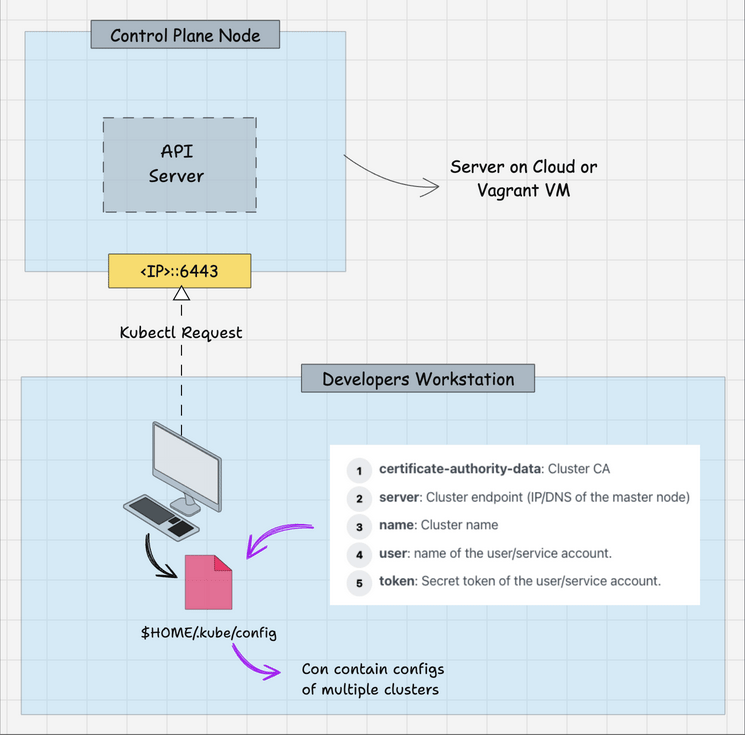
## 2. kubeconfig — Your Kubernetes Identity File
Start by inspecting the current kubeconfig:
```bash
kubectl config view
```
### Example output (simplified)
```yaml
clusters:
- name: default
cluster:
server: https://127.0.0.1:6443
certificate-authority-data: LS0tLS1CRUdJTiBDRVJUSUZJQ0FURS0tLS0t...
users:
- name: default
user:
client-certificate-data: LS0tLS1CRUdJTiBDRVJUSUZJQ0FURS0tLS0t...
client-key-data: LS0tLS1CRUdJTiBSU0EgUFJJVkFURSBLRVktLS0tLQo=
```
By default, sensitive fields are hidden. To reveal everything:
```bash
kubectl config view --raw
```
---
## 3. `certificate-authority-data` — The Root of Trust
Extract the CA certificate from kubeconfig:
```bash
CERTIFICATE_AUTHORITY_DATA=$(kubectl config view --raw \
| grep certificate-authority-data \
| awk -F': ' '{print $2}')
echo $CERTIFICATE_AUTHORITY_DATA
```
### What this is
- `certificate-authority-data` = **CA certificate (`ca.crt`)**
- Public information
- Defines **which API server kubectl trusts**
Decode from base64:
```bash
echo $CERTIFICATE_AUTHORITY_DATA | base64 -d
```
Inspect the certificate:
```bash
echo $CERTIFICATE_AUTHORITY_DATA | base64 -d | openssl x509 -text --noout
```
### Example output
```text
Issuer: CN = kubernetes
Subject: CN = kubernetes
Validity:
Not Before: Jan 1 00:00:00 2025 GMT
Not After : Jan 1 00:00:00 2035 GMT
```
### Explanation
|Field|Meaning|
|---|---|
|Issuer|Certificate Authority that signed it|
|Subject|Identity of the CA|
|Validity|Trust lifetime|
> 🔐 This certificate is the **root of trust for the entire cluster**
---
## 4. `client-key-data` — User Private Key
Extract the private key:
```bash
CLIENT_KEY_DATA=$(kubectl config view --raw \
| grep client-key-data \
| awk -F': ' '{print $2}')
echo $CLIENT_KEY_DATA | base64 -d
```
### Explanation
- This is the **private key of the user**
- Never sent over the network
- Used to **prove ownership of the certificate**
> ❗ Losing this key = losing the identity
---
## 5. `client-certificate-data` — Where RBAC Begins
Extract the client certificate:
```bash
CLIENT_CERTIFICATE_DATA=$(kubectl config view --raw \
| grep client-certificate-data \
| awk -F': ' '{print $2}')
echo $CLIENT_CERTIFICATE_DATA | base64 -d
```
Inspect it:
```bash
echo $CLIENT_CERTIFICATE_DATA | base64 -d | openssl x509 -text --noout
```
### Example output (CRITICAL)
```text
Subject:
CN = admin
O = system:masters
```
### How Kubernetes interprets this
|Field|Meaning|
|---|---|
|CN|username|
|O|group|
> ❗ Kubernetes **does not store users**
> It **trusts the identity inside the certificate**
---
## 6. `system:masters` — Kubernetes Root Group
List ClusterRoleBindings:
```bash
kubectl get clusterrolebindings -o wide
```
### Example output
```text
NAME ROLE GROUPS
cluster-admin ClusterRole/cluster-admin system:masters
```
Inspect the role:
```bash
kubectl describe clusterrole cluster-admin
```
### Output (excerpt)
```text
Resources: *
Verbs: *
```
> 🔥 Any user in `system:masters` = **cluster root**
---
## 7. `kubectl auth can-i` — RBAC X-Ray Tool
```bash
kubectl auth can-i '*' '*'
```
Output:
```text
yes
```
Simulate another identity:
```bash
kubectl auth can-i '*' '*' \
--as=batman \
--as-group=cluster-superheroes
```
> Kubernetes **does not create the user**
> It **simulates the authorization decision**
---
## 8. Creating a Custom Superuser Group
### 8.1 Create ClusterRole
```bash
kubectl create clusterrole cluster-superhero \
--verb='*' \
--resource='*'
```
|Attribute|Meaning|
|---|---|
|verb='*'|All actions|
|resource='*'|All resources|
---
### 8.2 Bind the Role to a Group
```bash
kubectl create clusterrolebinding cluster-superhero \
--clusterrole=cluster-superhero \
--group=cluster-superheroes
```
|Attribute|Meaning|
|---|---|
|clusterrole|Permissions|
|group|Who receives them|
---
## 9. Creating a User via Certificates
### 9.1 Generate a Private Key
```bash
openssl genrsa -out batman.key 4096
```
- Creates an RSA private key
- Represents the **user identity**
---
### 9.2 Create a Certificate Signing Request (CSR)
```bash
openssl req -new \
-key batman.key \
-out batman.csr \
-subj "/CN=batman/O=cluster-superheroes" \
-sha256
```
|Field|Meaning|
|---|---|
|CN|username|
|O|group|
---
## 10. Kubernetes CSR API
Create the CSR object:
```yaml
apiVersion: certificates.k8s.io/v1
kind: CertificateSigningRequest
metadata:
name: batman
spec:
request: <base64 CSR>
signerName: kubernetes.io/kube-apiserver-client
usages:
- client auth
```
Apply it:
```bash
kubectl apply -f batman-csr-request.yaml
```
Check status:
```bash
kubectl get csr
```
```text
NAME AGE SIGNERNAME REQUESTOR CONDITION
batman 5s kubernetes.io/kube-apiserver-client admin Pending
```
---
### 10.1 Approve the CSR
```bash
kubectl certificate approve batman
```
```bash
kubectl get csr
```
```text
batman Approved,Issued
```
---
### 10.2 Retrieve the Signed Certificate
```bash
kubectl get csr batman \
-o jsonpath='{.status.certificate}' \
| base64 -d > batman.crt
```
Verify:
```bash
openssl x509 -in batman.crt -text -noout
```
---
## 11. Creating kubeconfig for the User
```bash
kubectl config set-credentials batman \
--client-certificate=batman.crt \
--client-key=batman.key \
--embed-certs=true
```
```bash
kubectl config set-context default \
--cluster=default \
--user=batman
```
```bash
kubectl config use-context default
```
---
## 12. Verifying Access
```bash
KUBECONFIG=batman.config kubectl get nodes
```
```bash
KUBECONFIG=batman.config kubectl run nginx --image=nginx
```
```bash
KUBECONFIG=batman.config kubectl delete pod nginx --now
```
✔ Works → RBAC is correctly configured
---
## 13. Roles vs ClusterRoles
|Role|ClusterRole|
|---|---|
|Namespace-scoped|Cluster-wide|
|Safer|More dangerous|
|Preferred default|Use carefully|
---