```
systemd-analyze security
```
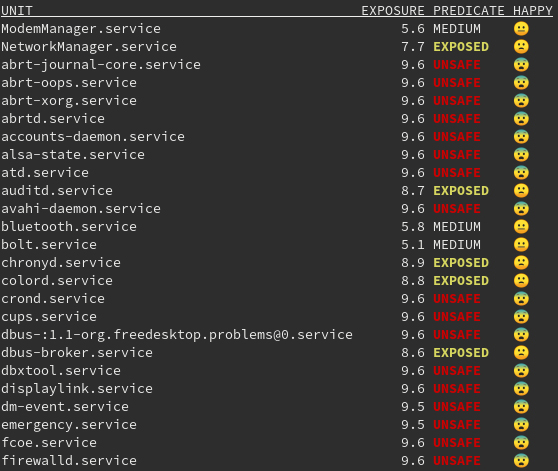
`systemd-analyze security` is one of those tools that often looks scary at first glance. You run it on a live server or a Kubernetes node, see dozens of lines marked `UNSAFE`, and it immediately feels like the system is in a catastrophically insecure state. In practice, this is almost always a misinterpretation.
This tool does not try to answer the question _“Is this service vulnerable?”_. Instead, it answers a very different and much more engineering-oriented question: **what system privileges are available to a process, and how large would the potential impact be if that process were compromised**. Seen from this perspective, `systemd-analyze security` becomes extremely useful in production environments.
---
### What `systemd-analyze security` actually analyzes
`systemd-analyze security` performs a static analysis of a systemd unit file and checks which isolation and hardening mechanisms are enabled or missing. It looks at things like the ability to gain new privileges, access to hardware devices, use of namespaces, write access to system directories, loading kernel modules, creating executable memory mappings, and similar capabilities.
It is important to understand the boundaries of this tool. It does not analyze service code, does not search for CVEs, does not scan the network, and does not take SELinux or AppArmor policies into account. This is not a security scanner and not a pentest tool. It is a **systemd configuration linter** that shows how “wide” a process’s privileges remain from the kernel’s point of view.
---
### Why almost all system services look `UNSAFE`
If you run `systemd-analyze security` without arguments, you will almost certainly see that services like `systemd-udevd`, `dbus`, `polkit`, `networkd`, `sshd`, `k3s`, `containerd`, and many others have an `UNSAFE` rating in the range of 8–10. This is not a bug and not a sign of a poorly secured system.
The reason is simple: these are **core system daemons** without which Linux simply cannot function. They must have access to devices, netlink, cgroups, `/proc` and `/sys`, user and terminal management, and the networking stack. Trying to “lock down” such services with aggressive sandboxing options will almost certainly result in a broken system.
In the context of `systemd-analyze security`, the word `UNSAFE` only means that systemd **does not significantly restrict** this service. It does not mean that the service is inherently vulnerable, buggy, or insecure.
---
### How to read the output correctly: the example of `ssh.service`
Let’s look at a typical output for `ssh.service`. You will see messages stating that the service runs as root, may acquire new privileges, may create namespaces, may send signals to other processes, and so on. If you read these lines literally, the output looks alarming. For SSH, however, this behavior is entirely expected.
The SSH daemon must run as root because it opens a privileged port, works with PAM, switches user IDs, manages TTYs, and interacts with `systemd-logind`. Restricting its capability set or disabling privilege escalation would simply break SSH’s operating model. In this case, a high exposure score is not a problem—it is a conscious architectural choice.
---
### Where the tool is actually valuable
The real value of `systemd-analyze security` appears not when analyzing system daemons, but when checking **custom services**. If a homegrown application, monitoring agent, CI runner, or auxiliary daemon suddenly shows an exposure level of `8.9 UNSAFE`, it almost always means that the service is running with excessive privileges without any real need.
In such cases, the tool allows you to very quickly answer a simple question: _“Why is this process allowed to do all of this?”_
And in most cases, the answer is: _“There is no good reason.”_
---
## Practical example: how to read `systemd-analyze security` and actually improve a service
![[Pasted image 20251228105153.png]]
```bash
systemd-analyze security ssh.service
```
### Initial situation
Assume there is a custom service on the server called `my-agent.service`. This could be a monitoring agent, an integration with an external API, or any auxiliary daemon that is not part of the system core.
The unit file looks minimal:
```ini
[Unit]
Description=My custom agent
[Service]
ExecStart=/opt/my-agent/agent
Restart=always
[Install]
WantedBy=multi-user.target
```
The service works fine. Nothing is broken. But nobody has asked any security questions yet.
---
### First run of `systemd-analyze security`
Now we check the service:
```bash
systemd-analyze security my-agent.service
```
A typical result looks like this:
```
✗ NoNewPrivileges Service may acquire new privileges
✗ ProtectSystem Service has full access to system
✗ ProtectHome Service has full access to home directories
✗ PrivateDevices Service has access to hardware devices
✗ RestrictNamespaces Service may create namespaces
✗ CapabilityBoundingSet Service runs with full capabilities
→ Overall exposure level: 9.4 UNSAFE
```
At this stage, **it is important not to panic**.
The tool is not saying that the service is vulnerable. What it is saying is this:
> if the process is compromised,
> it can do almost everything that root can do on the host.
For a custom agent, this is almost always unnecessary.
---
### Interpreting the result
If you ask yourself a simple question—_what does this service actually need?_—the answer usually looks like this:
It should not modify system files, it should not see `/home`, it should not work with hardware devices, it should not create namespaces, and it should not be able to escalate privileges.
That is exactly what the high exposure score is telling you.
---
### Minimal hardening (without fanaticism)
Now we add basic restrictions without breaking the service:
```ini
[Service]
ExecStart=/opt/my-agent/agent
Restart=always
NoNewPrivileges=true
PrivateTmp=true
ProtectSystem=strict
ProtectHome=true
PrivateDevices=true
RestrictNamespaces=true
MemoryDenyWriteExecute=true
CapabilityBoundingSet=
```
There is nothing exotic here. This is a standard set of options suitable for **most user-space services**.
---
### Re-running the analysis
Restart the service and analyze it again:
```bash
systemctl daemon-reexec
systemctl restart my-agent.service
systemd-analyze security my-agent.service
```
Now the output looks roughly like this:
```
✓ NoNewPrivileges
✓ ProtectSystem
✓ ProtectHome
✓ PrivateDevices
✓ RestrictNamespaces
✓ CapabilityBoundingSet
→ Overall exposure level: 1.6 OK
```
This means that the service still works, the code has not changed, but the potential damage in case of a compromise has been reduced **by an order of magnitude**.
---
### Why this is the right result
It is important to stress that we did **not** try to make the service “perfectly secure”.
We made it predictable, constrained, and aligned with the principle of least privilege.
If tomorrow an RCE appears in `my-agent`, an attacker will not be able to read `/etc`, will not be able to poke around in `/proc` and `/sys`, will not be able to create namespaces, will not be able to load kernel modules, and will not be able to escalate privileges.
That is exactly the purpose of `systemd-analyze security`.
---
### The contrast: why you cannot do this with `ssh.service`
If you try the same approach with `ssh.service`, it quickly becomes obvious that most of these options are incompatible with its logic. SSH must run as root, use PAM, change UIDs, manage TTYs, and interact with other systemd services.
That is why a high exposure score for `ssh.service` is an **architectural necessity**, while the same score for `my-agent.service` is simply unnecessary risk.
---
### The key takeaway from this example
This example illustrates the core idea:
`systemd-analyze security` is not designed to “fix systemd”.
It is designed to **find unnecessary privileges where they are not needed and remove them calmly and deliberately**.
If you see `UNSAFE` after analyzing a custom service, it is almost always an invitation to ask the question:
_“Why is this service allowed to do all of this?”_
And most of the time, the honest answer is: _“It shouldn’t be.”_